Zendesk Marketplace App

Stop chasing agents for missing escalation context.

Escalation Guard adds structured handoffs inside Zendesk. Agents provide the required context. Escalation Guard creates a consistent internal note and adds tags for the Zendesk workflows you already use.

Free plan available · Pro from $3/agent/month

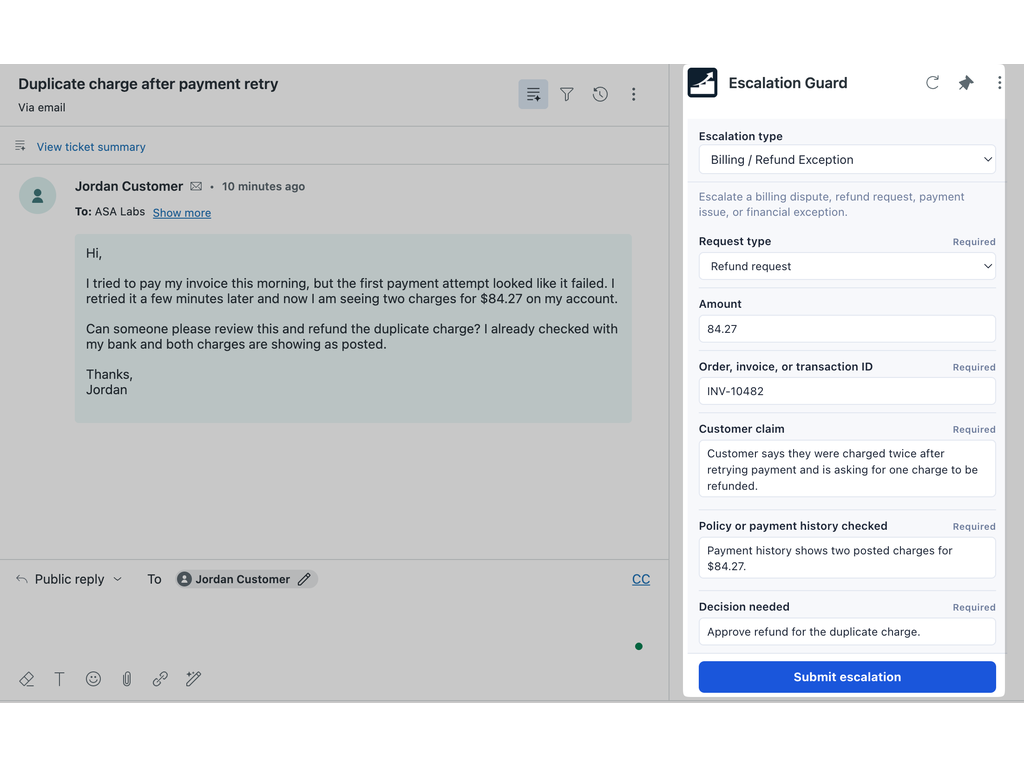
The Escalation Guard form in the Zendesk ticket sidebar, with required fields for a billing and refund exception escalation

Escalations should not depend on memory.

When an escalation shows up without the order number, what was already checked, or the decision needed, someone has to go back and ask. The ticket waits while they do.

Agents can't submit until the context is there.

You decide what each escalation type needs. The agent picks the type in the ticket sidebar and fills in the form. Required fields have to be completed before it will submit.

  • Text, long text, dropdown, checkbox, number, and URL fields
  • Each field is required or optional
  • Agents only see the escalation types you've enabled
A Zendesk ticket about a duplicate charge with the Escalation Guard form open in the sidebar, most fields marked Required

A clean handoff every time.

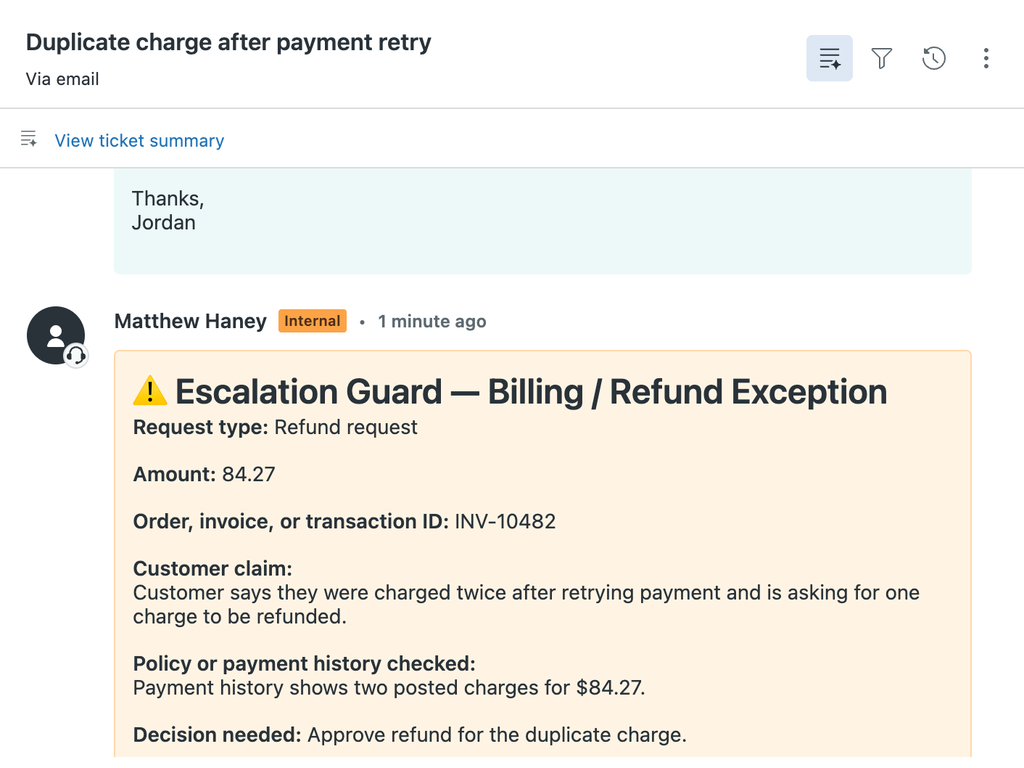
What the agent entered becomes one internal note on the ticket, laid out the same way every time. The receiving team reads it and acts. Blank optional fields are left out.

Internal note on a Zendesk ticket written by Escalation Guard, listing request type, amount, transaction ID, customer claim, and decision needed

Works with the Zendesk workflows you already have.

Escalation Guard adds tags when the escalation is submitted. It does not assign or route the ticket itself. Your triggers, views, automations, and reports pick up the tag the same way they would any other.

How routing tags work

  1. AgentSubmits a Billing / Refund Exception escalation.
  2. Escalation GuardAdds escalation_guard_billing_refund_exception to the ticket. Existing tags are left alone.
  3. Your Zendesk triggerSees the tag and assigns the ticket to your billing group.

An example. The tag names and the trigger are yours.

You decide what a complete escalation looks like.

Build a template for each escalation type: the questions, which ones are required, and the tags. Setup is in the Zendesk left navigation. No separate dashboard. No new ticketing workflow.

  • Starter templates for common escalation types
  • Turn a template off while you draft it
  • Preview the note before agents use it

Setup steps

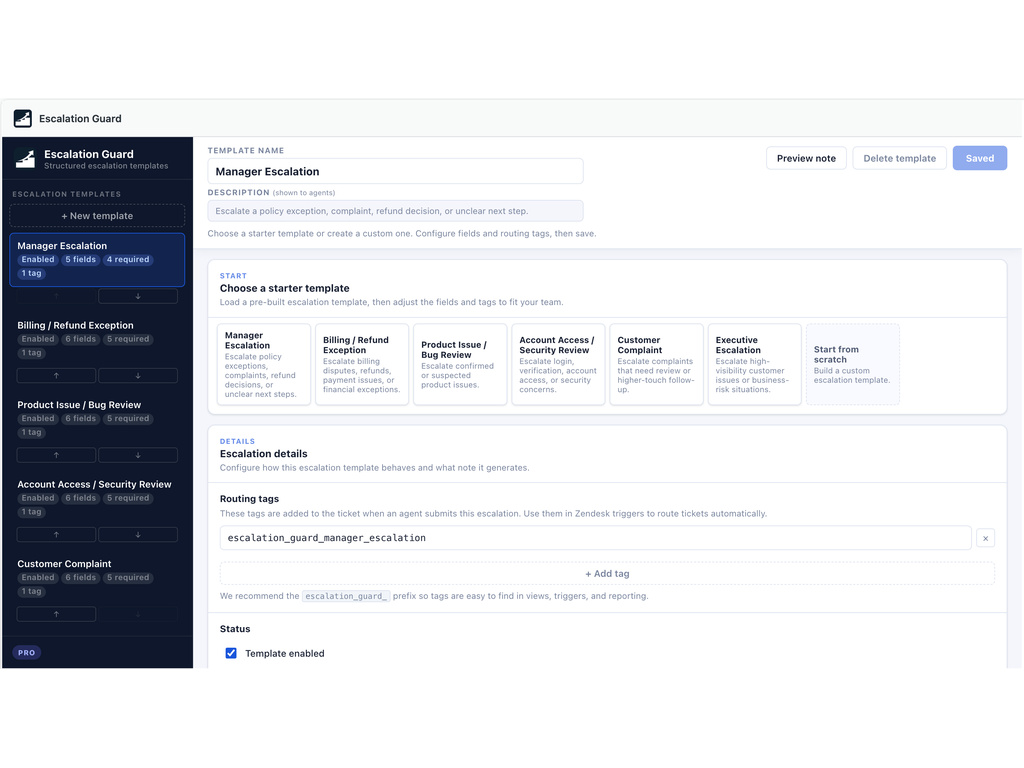
Escalation Guard Template Builder in Zendesk showing escalation templates, starter templates, routing tags, and the enabled toggle

Keep your Zendesk data structured.

On Pro, map an answer to one of your existing Zendesk ticket fields. The value is written to the field as well as the note, so views, triggers, and reports can use it.

How field mapping works

Order, invoice, or transaction ID
Order IDText ticket field
Customer claim
Escalation summaryMulti-line ticket field
Policy reviewed
Policy reviewedCheckbox ticket field

Example mappings. Works with text, multi-line, dropdown, and checkbox ticket fields.

Install from MarketplaceRead the docs

Free to start. Pro for teams managing escalations across workflows.

Lite standardizes one escalation path. Pro adds the flexibility teams need to manage escalations across departments, workflows, and existing Zendesk fields.

Lite

Free

Standardize one common escalation path. Best for teams that want agents to submit better manager escalations without extra setup.

  • 1 escalation template
  • Up to 5 fields
  • Required fields
  • 1 routing tag
  • Formatted internal note
  • Manager Escalation starter template

Install from Marketplace

Not sure which plan you need? Start with Lite for free.

Built inside Zendesk.

  • Runs inside Zendesk, in the ticket sidebar and left navigation
  • What agents type stays on the ticket
  • No AI
  • Does not replace your triggers or views, or remove existing tags

Escalation Guard runs within the Zendesk App Framework and uses Zendesk data only to support configured handoff workflows, internal notes, and optional ticket updates.

The app sends us basic usage data: app version, plan, your Zendesk subdomain, a random install ID, and counts like how many templates you have. It never sends ticket content or what agents type into an escalation.

It does not sell customer data, use customer data for advertising, or share customer data with unauthorized third parties.

Questions or feedback? Let’s talk.

Have a question about Escalation Guard or another ASA Labs app? Send a note and we'll get back to you within one business day.

Prefer email? hello@asa-labs.com