Define the workflow
Add the steps agents must complete: Zendesk fields, confirmations, internal notes, or a resolution summary template.
Require agents to complete key steps before a ticket can be solved.
A ticket can have every required field filled out and still not be ready to solve. The refund may not be documented. The customer may not be verified. ResolveReady puts those requirements in the ticket sidebar, where the agent is already working, and can stop the solve until they are done.
Free plan available. Pro from $3.00 per agent per month.
Overview
Zendesk can make a field mandatory. It cannot make sure the approval was documented, the requester was verified, or the escalation note actually contains what the next team needs. Macros do not enforce anything, and a checklist in a wiki is a checklist nobody opens.
ResolveReady turns those expectations into workflows that live in the ticket, apply only where they should, and can block the solve until the work is done.
Add the steps agents must complete: Zendesk fields, confirmations, internal notes, or a resolution summary template.
Target tickets by tag, form, group, brand, status, or custom field value. Agents only see what applies to the ticket in front of them.
Warn agents when steps are missing, or prevent the ticket from moving to Solved, Pending, or On-hold until they are complete.
Screenshots
ResolveReady sits directly inside Zendesk and guides agents through the required steps before a ticket can be resolved.
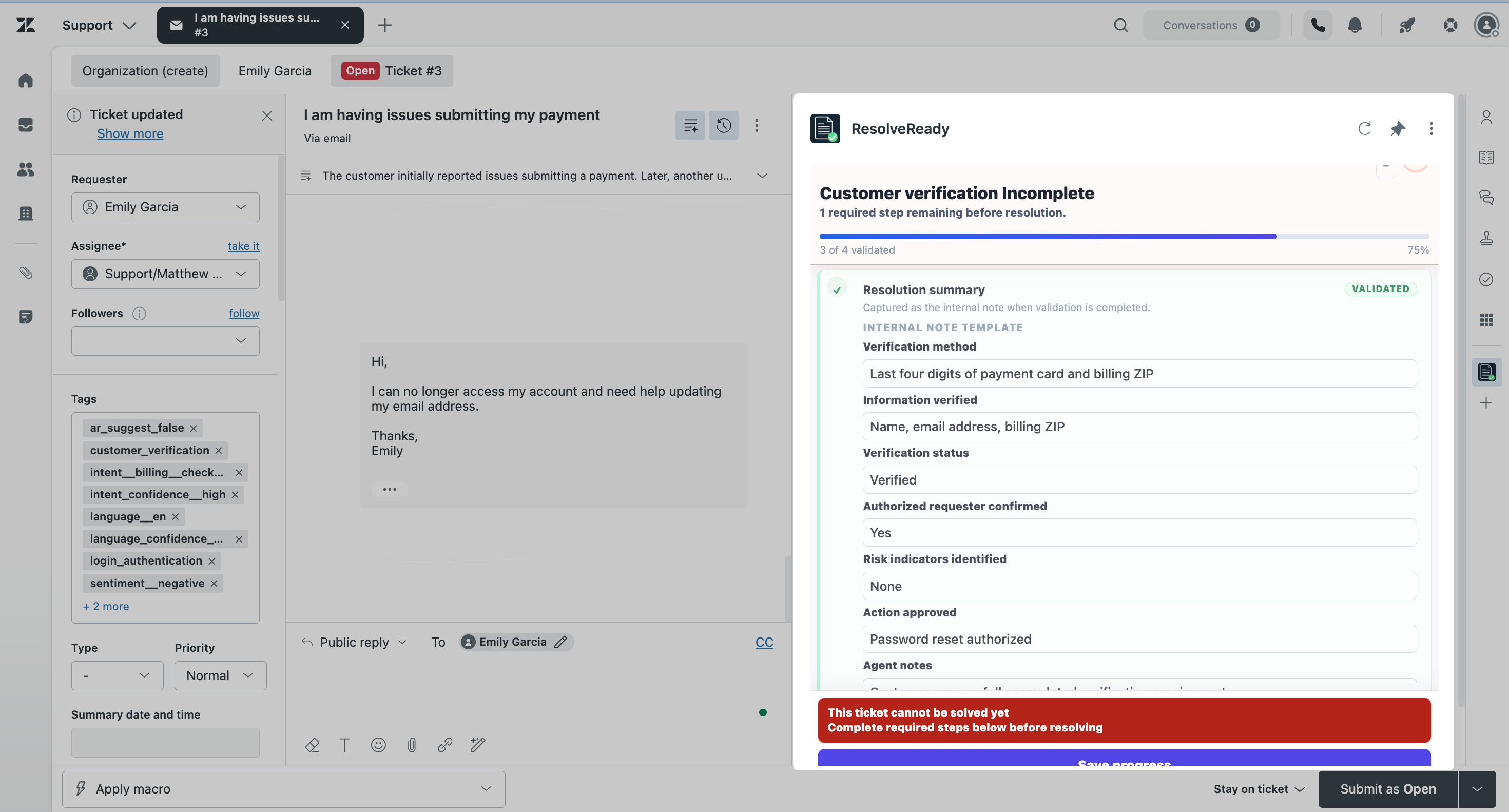
The sidebar tracks what is complete, what is outstanding, and what still needs attention before the ticket is eligible to be solved.
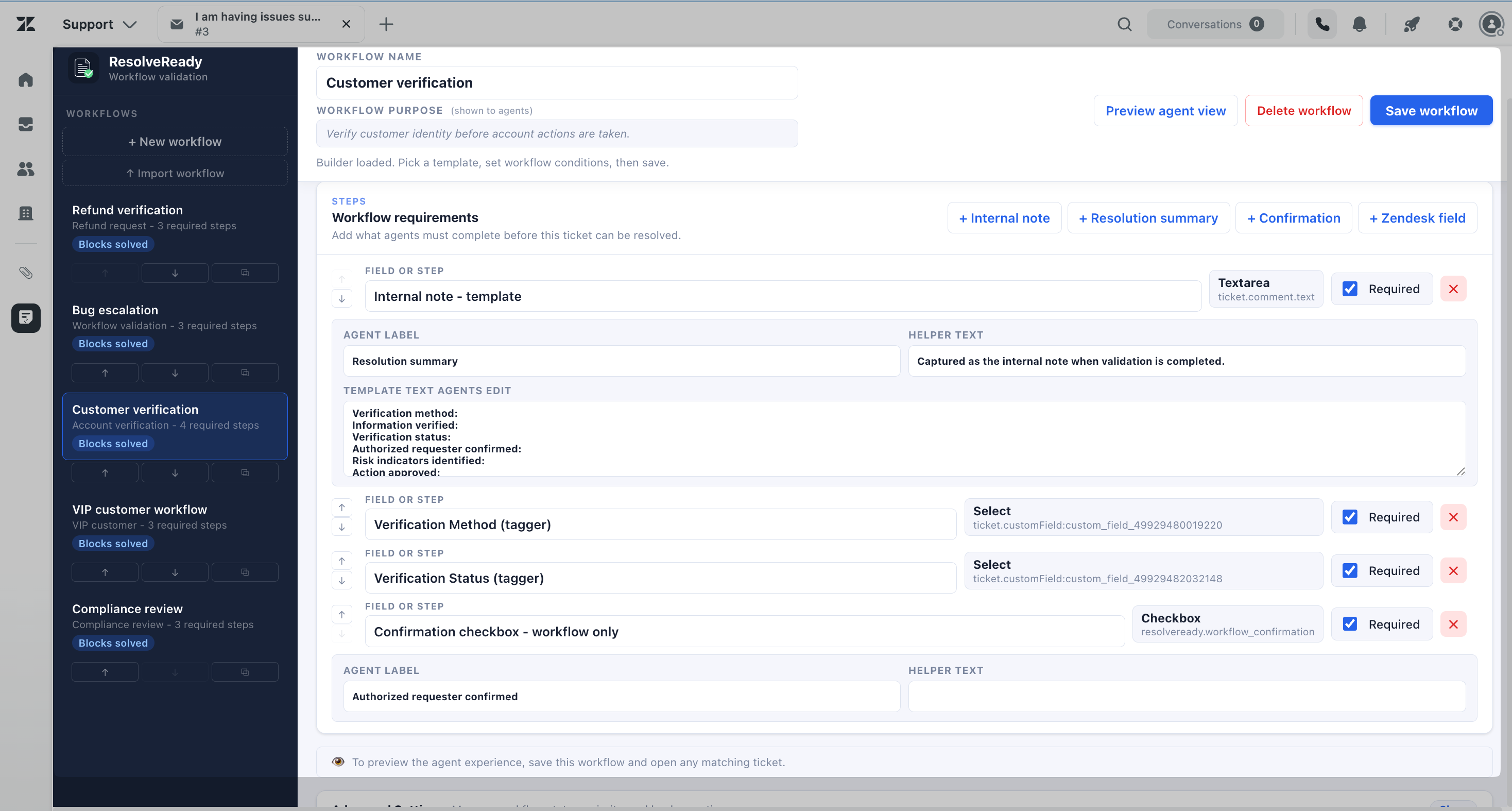
Start from a template or build from scratch. Map Zendesk fields, add confirmations, write note templates, and set the conditions that decide when the workflow appears.
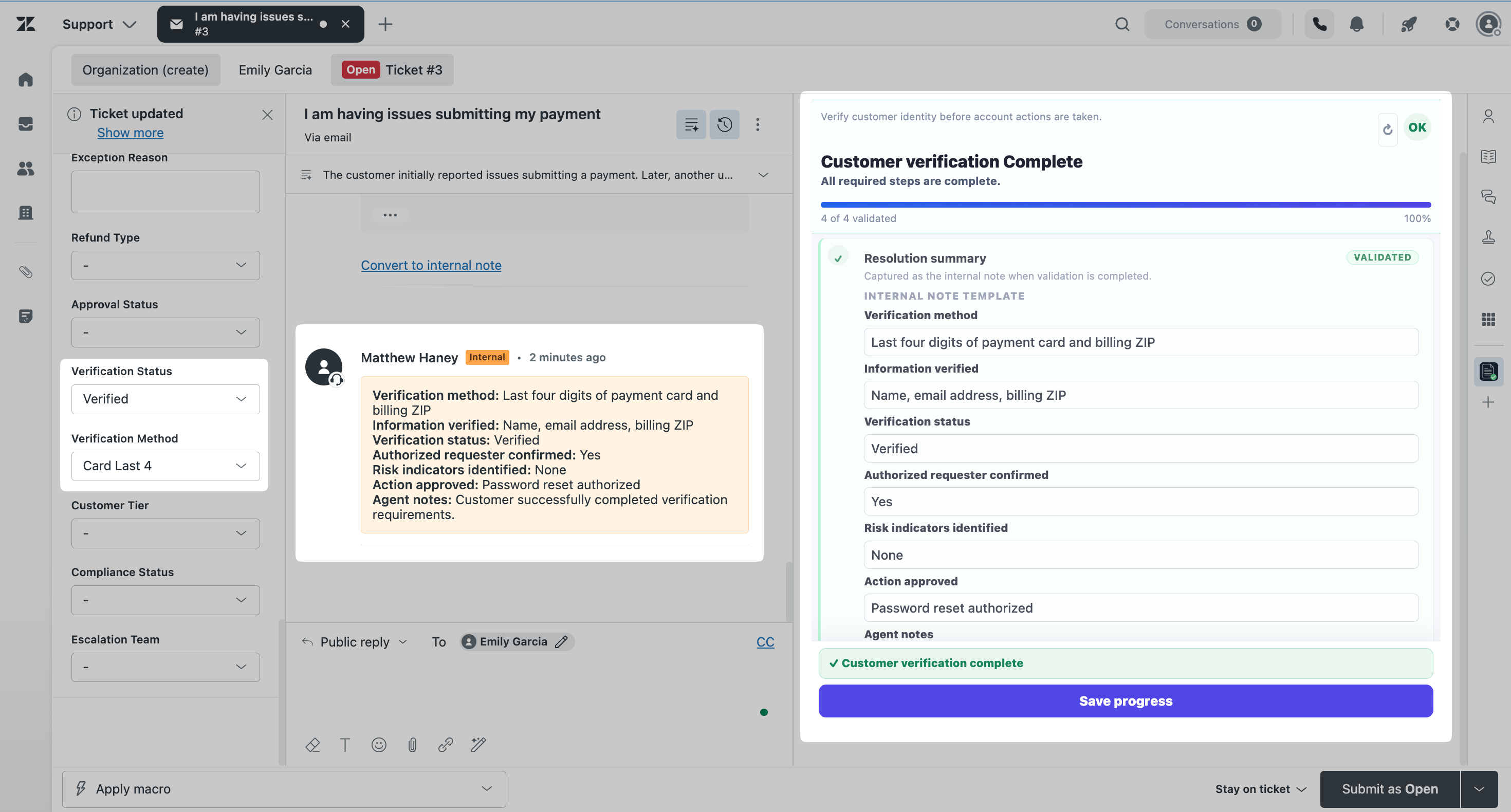
Completed workflows can be written back to the ticket as a structured internal note, so reviewers and managers can see what was checked.
Features
Most support teams already know what should happen before a ticket is resolved. The challenge is making sure it happens consistently across every queue, shift, and agent.
Stop a ticket from moving to Solved, Pending, or On-hold while required steps are still outstanding.
Zendesk fields the agent fills in from the sidebar, confirmations they tick, internal notes they write, and resolution summary templates you define.
Supported Zendesk fields can be completed inside the workflow, so agents are not moving back and forth to the ticket form.
Apply workflows using tags, forms, groups, brands, statuses, or custom field values that already exist in Zendesk.
Configure workflows without engineering support and update them as your processes change.
Capture what was checked as a structured internal note, so quality reviews are not archaeology.
Why ResolveReady
Refunds, identity verification, escalations, compliance checks, VIP handling. These are the processes that are easy to skip under queue pressure and hard to enforce with ticket fields alone, and the cost of missing a step usually shows up later, in a reopen, an audit, or an escalation.
ResolveReady is for teams that want that process enforced at the point of resolution, without building a separate tool or redesigning their Zendesk setup.
Catch the missing approval or undocumented refund before the ticket closes, not after the customer writes back.
Escalations arrive with the details the next team needs, because the workflow required them.
New agents see the process in the ticket instead of learning it from a document they have to remember to open.
Pricing
Lite is a real workflow, not a demo. It blocks solves, it captures a field, and it is free. Pro is for teams running more than one process.
Free
One process, enforced. For teams getting started.
$3.00 / agent / month
14-day free trial. For teams running more than one process.
Questions about fit, volume, or a workflow you want to talk through before installing.
Get in touchSolve blocking requires Zendesk Support Professional or higher, or Suite Growth or higher. On Starter and Team plans the workflow still runs and still shows agents what is missing. Details in the technical reference.
Privacy
Workflows are evaluated in the agent's browser, and workflow answers are written back to Zendesk. Ticket content and customer data are never transmitted to, seen by, or stored by ASA Labs.
The app sends anonymous usage telemetry, limited to the app version, plan, an anonymous installation identifier, and configuration counts such as how many workflows are configured. It contains no ticket content, no workflow answers, and no personal data. ResolveReady does not sell customer data, use it for advertising, or share it with unauthorized third parties.